Explode Model
Explode the model by property for targeted review
Spread a grouping's elements apart along up to three axes so a breakdown can be inspected piece by piece, then reset it.
Manage and Simulate
Section Box Manager
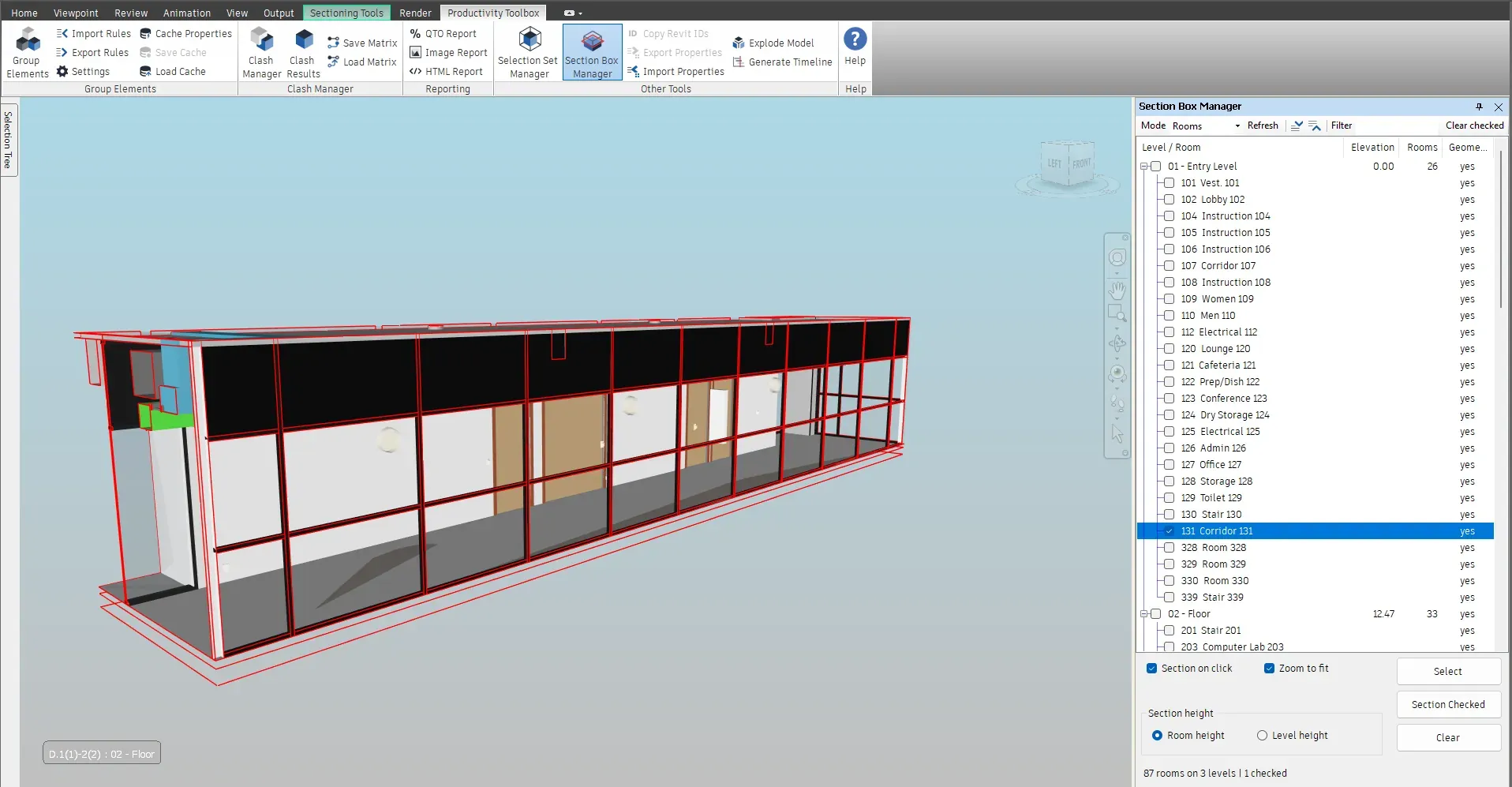
The Section Box Manager pane lists the Revit rooms of the model under their levels, or just the levels. Click a room or a level and the view is sectioned to its bounding box, optionally zoomed to fit. Tick several rows and Section Checked sections them together.
What it does
A pane that lists the Revit rooms under their levels. One click sections the view to that room or level, and checked rows are sectioned together.
How it works
Section Box Manager on the Other Tools panel lists the levels of the model with their Revit rooms underneath. Switch to Levels to list the levels alone. A level's box then covers every element on that level, not only its rooms.
The view is sectioned to the bounding box of the row. Zoom to fit is optional. Choose whether rooms use their own height or the full height of their level.
Tick the rooms of a zone and press Section Checked to section them together. Select picks their elements in the model.
Navisworks sectioning works with planes and a box you drag by hand. The Section Box Manager reads the room and level information the Revit export already carries and turns each room into a ready-made section box. A plant room, a riser or a corridor is isolated with one click, and a level cut is exact instead of approximate.
The pane lives under Other Tools and works in both Navisworks Manage and Navisworks Simulate. It needs Revit rooms in the model; rooms exported without geometry are counted so the export settings can be fixed in Revit.
At a glance
Pressing F1 on any of these ribbon buttons opens the help page for that command on this site, which forwards to the section of the user guide that documents it.
Spread a grouping's elements apart along up to three axes so a breakdown can be inspected piece by piece, then reset it.
Manage and Simulate
Colour the model by property value and export saved viewpoints that keep the group tree and its colours.
Manage and Simulate
Select elements in the model and see every selection or search set that contains them, nested folders included.
Manage and Simulate
30 days, unrestricted. Download it from the Autodesk App Store and run the installer; no administrator rights needed.